Category: Website

  • How to give website revisions feedback

    How to give website revisions feedback

    Providing effective feedback during a website build ensures your project stays on schedule and meets your expectations. From written notes to video recordings, understanding the best practices for website revisions helps designers implement your vision accurately and efficiently.


    When chatting with the numero® website team there is one frustration which happens more than any other.

    We are waiting for client feedback.

    Why is this such a big issue?

    Project management timelines are based on ‘dependencies’ – these are tasks which must be completed before another task can be started. And we don’t do anything without client approval. Some clients trust us with pre-approvals – but that’s never the case when we are building websites.

    Website builds are different. They’re personal – businesses have high standards and it’s important that brand values and tone of voice are accurately reflected in the build. This requires dialogue and feedback between the numero team and the client.

    How to give website revisions / feedback as a client

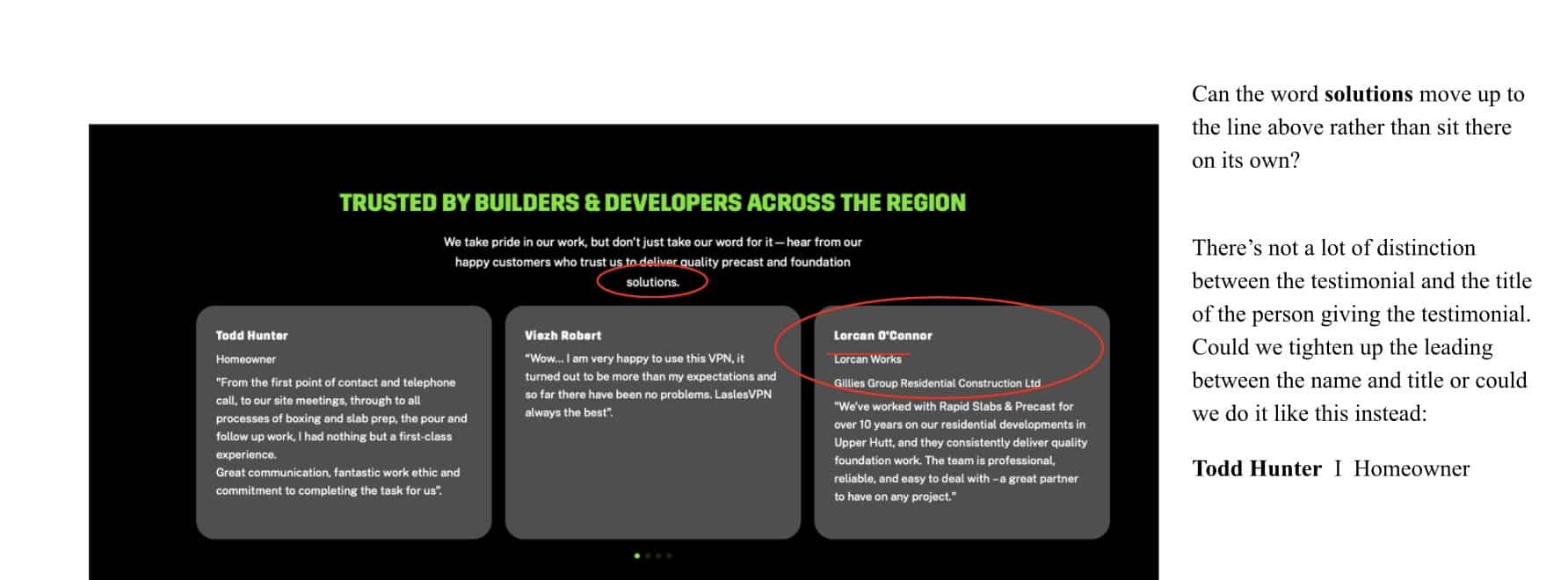
    Rapid Slabs and Precast is a client who gave good website feedback. Let us show you.

    Here’s a picture taken from a document they made. Each change is circled in red ink and on the right the instruction about what to change is made clear.

    Feedback on website build layouts

    Different types of feedback

    Sometimes you know exactly what you want changed – like the apostrophe in the example above.

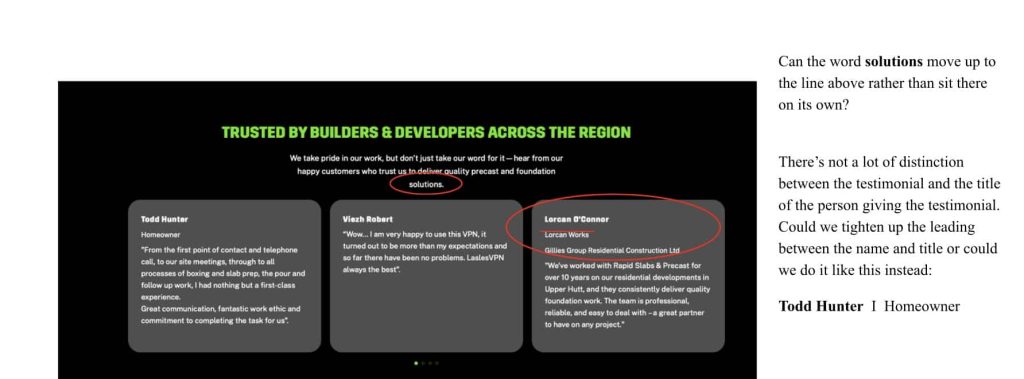
    Other times you may have a question or be unsure which version is better. Take a look at this image – the top remark is a simple instruction to make a change. The lower one makes it clear what the end result the client wants – more distinction between the job title of the person and their name – but the client wasn’t sure exactly how to achieve this.
    Website feedback that asks a question

    This is good feedback. Because we now know that there’s an issue – and our designers can use their design skills to present solutions. You don’t have to know the answer when giving feedback – it’s fine to ask for alternative layout options.

    Other ways to give feedback

    If you aren’t a fan of the written word, you can also easily give feedback using video. Loom is a great free software tool that allows you to make a video which is up to 5 minutes long.

    It shares your screen so you can load up the site and then describe your feedback and use your mouse as a pointer or to highlight the area you are talking about.

    I recorded this from our own website as an example for you.

    Website build delays

    The inspiration for this article came from a post shared on LinkedIn – here it is and my reply.

    Hi, my name’s Kim, and I’m going through a rebrand.
    One that was meant to be finished 𝙨𝙞𝙭 𝙢𝙤𝙣𝙩𝙝𝙨 𝙖𝙜𝙤.

    Back in 2013, I paid someone on Upwork to do my logo. I did not expect to keep them as long as I did, but a decade flashed by and here we are.

    Earlier this year, I decided we’d grown up a bit and it was time to get the experts in. Proper job. Big thanks to Gemma Ede, Monsoon Creative, and Alex Browning. (They’ve been incredible!)

    The problem? Me.


    How much time does this take? 𝐋𝐨𝐭𝐬.
    How much did I have? 𝐍𝐨𝐧𝐞.

    Am I scared about the rebrand? Not really. It’s time the brand “grew up.” We’ve got exceptional clients, and the new version reflects that.

    Did I completely underestimate how much time it would take? 𝐘𝐞𝐬. 𝐁𝐲 𝐥𝐨𝐭𝐬.

    Now I’m paying for it. The website should 𝙛𝙞𝙣𝙖𝙡𝙡𝙮 launch this November. I’ve learnt my lesson. I promise. Anyways, I’m tired.

    Rebranding experts out there: Any tips from lessons learnt the hard way?

    Our founder Richard couldn’t wait to reply… because we KNOW that this happens too often. And this was his advice.
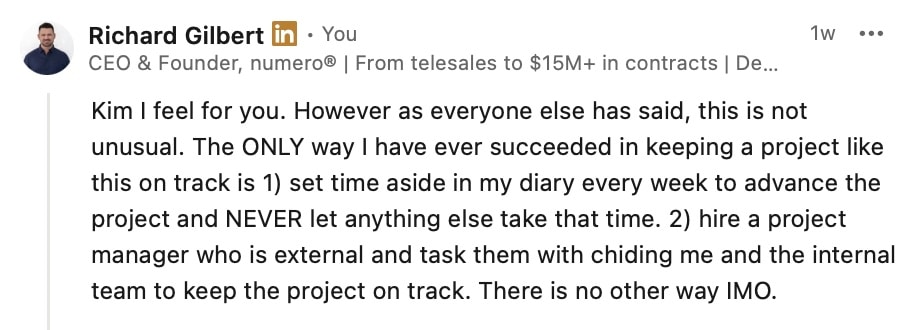
    Advice on project managing a new website rebrand

    Briefing designers takes practice

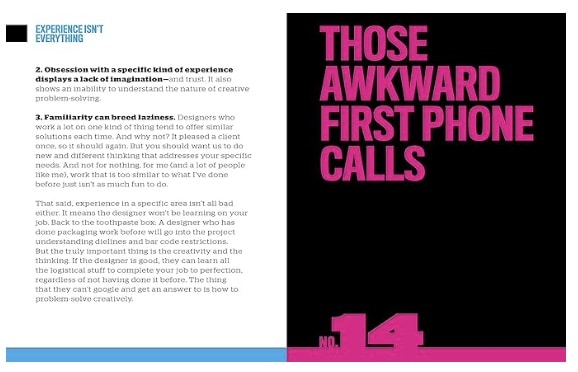
    You will only build a website once every 3-4 years but you probably work with graphic designers and web designers more regularly. There’s an amazing book which was written by a designer and explains in how to get what you want from creative people. It’s in the form of short letters – each chapter addresses a different situation. And it’s beautifully designed, as you’d expect from a designer.
    I commend it to you.
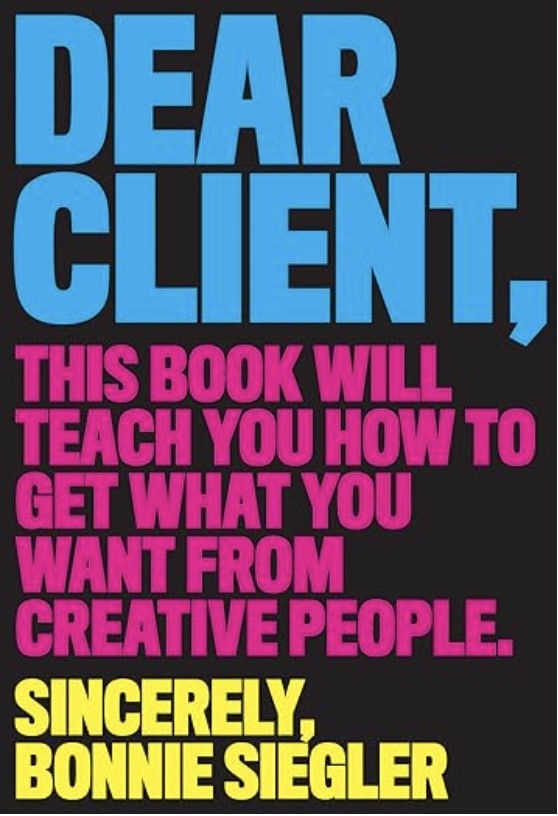
    Dear Client book by Bonnie Siegler
    Example chapter on first phone calls
  • Help I’ve lost my website backup

    Help I’ve lost my website backup

    This was a real phone call we got this morning.

    The client had a rogue employee who stole the computers containing all the detailed logins needed to keep the company’s marketing running.

    Bad things happen in business and numero® will always try to do the right thing to help you out.

    How we helped

    The website had never gone live – it was hosted on our server and at the time was awaiting client approval to go live. The design was nearly complete; we were just waiting for edits and feedback on the design. In effect, 90% of the website design work was complete.

    We have a full backup of the website and all the associated data. It is in our archive and was retrieved within one business day. This is one of the “failsafes” we put into place to support our clients.

    Failsafes are what enable numero® to be this helpful. We set up our business to be able to jump in and retrieve what looks like a really bad situation so that we can help our clients smooth the path back to normal business.

    Quick Security Checks for Trades Businesses

    Be wise before the event – here’s a checklist of failsafes which will support your business if trouble comes looking.

    • secure storage – all tools are locked up when not in use
    • vehicles – overnight is your main security concern. Alarms and GPS trackers can help
    • insurance – cover the trade tools, vehicles and office equipment that covers loss, theft and damage
    • inventory – know what tools and equipment you own and which site they’re on
    • digital security – strong, unique passwords and MFA (multi-factor authentication) for logins. Back up office computers daily including client contact details and project information. Cloud servers are better than local storage on your computer. Make sure your business wifi uses a strong password and encryption
    • contracts – keep digital copies of signed contracts
    • emergency plan – know what you will do if your business suffers interruption like a power outage, a flood or an earthquake. We were all unprepared when Covid-19 hit and we couldn’t go to our offices

    Your Business Growth

    A website is essential for business growth. Few new clients hire you without first checking your website. numero® knows how NZ business works; marketing is the vehicle we use to drive your business growth.

    When clients partner with us, you get to use all our long experience in business. We know the ups and downs. So we use failsafes like website backups to keep your marketing projects on track and reduce your business risk.

    Do trades hate marketing?

    Tradies have a reputation of hating marketing. It’s because you are on the tools, you’re practical and you are a visual person. You need to see it to understand it.

    Obscure technical jargon does not interest you because it makes you feel lost and out of control.

    So no, tradies don’t hate marketing, they hate working with marketing people who don’t understand tradies.

    Why tradies work with numero®

    We get it – you’re on the tools, not behind a desk crunching marketing numbers. That’s exactly why most tradies have avoided marketing for years. It feels like speaking a foreign language with no guarantee it’ll actually bring in jobs.

    Here’s the thing: we make trades marketing work because when you work with us, you understand what’s happening with your marketing. No jargon, no mysterious ‘brand awareness’ just clear explanations of what you’re paying for and what jobs it’s bringing in.

    Think of working with numero® like your toolbox – you wouldn’t buy a tool without knowing exactly what job it does, right? We explain marketing the same way.

    When we run Google Ads, it’s like having a sign on every street corner where your ideal customers are driving past. When we optimise your website, it’s like having your best salesperson working 24/7.

    We’re your marketing partner, not your marketing mystery box. You’ll know exactly what’s working, what isn’t, and why.

    Further resources

  • SEO Optimisation for Parallax Scrolling Websites

    SEO Optimisation for Parallax Scrolling Websites

    Website design and SEO are two things that should go hand-in-hand. You should not include a design feature on your website (parallax scrolling) unless you consider the implication for SEO. Parallax scrolling is a design feature, so how will it impact the SEO of your website? How can you optimise a parallax scrolling website?

    What is Parallax Scrolling?

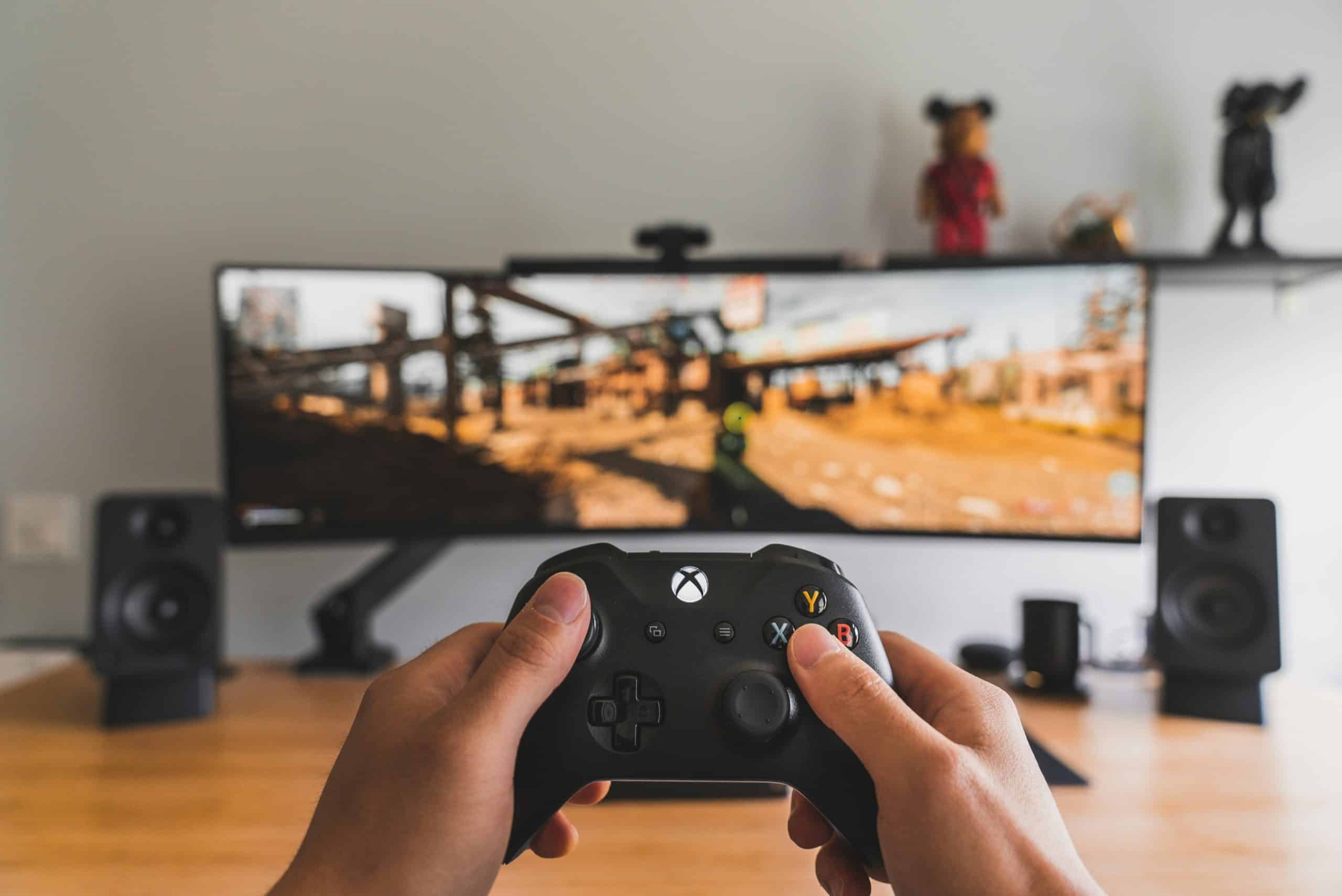
    Parallax scrolling has its origins in video game design. It is a website design technique where the background of the website’s page scrolls slower than the foreground (or content) of the page. So, you can have a background image that scrolls slower than the text on the page.

    The effect is to add depth to the page, making it feel more interactive and making it look almost 3D.

    It is an effect which can be overwhelming and/or distracting when used in the wrong context or when used too much. If implemented for subtlty so that the reader’s focus remains on the content of the page rather than letting a design quirk take over, parallax scrolling can enhance a website and make it more memorable and eye-catching.

    Parallax scrolling website video game
    Photo by Sam Pak on Unsplash

    The SEO Impact of Parallax Scrolling

    Generally, parallax scrolling is not in itself problematic for SEO. The search engine optimisation issues occur in its application.

    There are two ways that website designers use parallax scrolling:

    1. To add a design feature to a page on a website
    2. To make parallax scrolling a central feature of a one-page website

    The first approach is the least problematic. So long as the website has a good SEO architecture, the addition of a parallax scrolling feature to a page will have minimal impact on search engine ranking, although you do need to consider site speed – see below.

    Big problems arise, however, when you use parallax scrolling on one-page websites. The issue isn’t necessarily with the parallax scrolling feature but with the one-page design.

    There is an important factor to point out for any parallax scrolling element on a website – speed.

    Website Speed and Parallax Scrolling

    Parallax scrolling will slow down your website – it really is as simple as that. This could impact the SEO of your website, particularly if you already have a slow loading website. Test your website load speed.

    Where the problem of speed is most acute, however, is on the mobile version of your website. Parallax scrolling can slow down websites viewed on phones considerably, so you should think carefully before adding it.

    One helpful approach is to remove the parallax scrolling effect for anyone viewing your website on a mobile device.

    Why Parallax Scrolling is So Popular on One-Page Websites

    One-page website design is a design approach favoured by some for its minimalist style. You need to overcome the issue of having one long page of content, however. How do you stop the page from becoming boring?

    The solution that many website designers turn to is parallax scrolling. Parallax scrolling helps to break up content and grab the attention of visitors with visual uniqueness.

    In other words, it can be the difference between a one-page website design that is flat, uninspiring, and boring, and a website that works and visitors love (notwithstanding the speed caveat mentioned above).

    What’s the Problem with One-Page Websites?

    Parallax scrolling can make one-page websites work from a user’s perspective, but single page websites are problematic for SEO. This is because Google views them as one-page websites. While you might think that’s the whole point, this is not what search engines want.

    Instead, search engines want each section of your website (i.e. each section of your one-page website design) to have its own page and information. This helps give Google a better understanding of the content on the page and where it fits into its search results. It also allows one unique URL for each section. One page websites only have one URL.

    To get the best results, you should abandon the idea of a one-page website altogether, giving your website a multi-page site architecture instead. You can then add the parallax scrolling design feature to individual pages wherever you think it will enhance the user experience.

    You Want to Stick with a One-Page Design?

    What if you want to stick with a one-page design that uses parallax scrolling? This will never be as good as having multiple pages, but there are some things you can do to improve the SEO of your site.

    Create sections of content. This could be About Us, Services, Contact, etc. Most one-page websites have a menu that lets users jump to these specific sections on the page.

    Google doesn’t treat the links to these sections as separate URLs, but you can use workarounds. Specifically, you can use code that makes your website appear to Google as multiple pages with each page having its own unique content, page title, and meta description.

    This will enable Google to more effectively index your website which, in turn, helps ensure your website appears on searches for your priority keywords.

    The way to achieve this is to use Google’s guidelines for pages with infinite scroll. Infinite scroll pages and one-page websites with parallax scrolling are different, but the solution for infinite scrolling pages will optimise your site for Google search.

    Importantly, it will improve the SEO of your website while maintaining the one-page design for users. Therefore, you get the design features you want – one-page design with parallax scrolling functionality – while ensuring your site has the SEO structure it needs.

    SEO Optimisation Checklist for Parallax Websites

    • Compress background images to WebP
    • Disable parallax on mobile
    • Lazy-load background visuals
    • Serve content with proper HTML structure
    • Implement infinite scroll SEO guidelines
    • Create unique meta tags for each “virtual page”
    • Use jump links with descriptive anchors
    • Add schema for improved indexing

    Final Thought – Analytics

    This solution doesn’t solve all the issues with one-page websites that have parallax scrolling. The biggest is analytics.

    The analytics data you get from a one-page website is restricted to a single page. This means you can’t drill into the performance of each section of your website. You don’t know how many people clicked on each product or service section. Chunking your one-page website into different sections for SEO will not change that. This is a huge limitation for modern digital marketing and advertising. If you have an advert for one of your services, the destination URL will be the same as an advert for your contact us or about page. Not a good customer experience and likely to waste marketing dollars.

    Find out how an expert website designer can help you upgrade your website. Think about when you last updated your website (most businesses do a substantial redesign every 3 years). Each time a website gets upgraded, new functionality is added. You may be missing out on modern website functionality which could be helping your business sales growth. Contact Numero’s Experts Now for a no-obligation appraisal of your website.

  • What is the Going Rate for a Web Designer?

    What is the Going Rate for a Web Designer?

    “How much does a website cost?”

    “What’s the going rate for a web designer?”

    “How much should I pay for a website?”

    There’s no straightforward answer to these questions. How much a website costs will depend on a variety of factors. And the going rate for a web designer also varies from person to person depending on their experience, skills and expertise among other things.

    But we are definitely not going to avoid that question. You will find some real numbers in this post that will provide you a good idea about the cost of building your business website.

    Before we delve any further, it’s important to set the context.

    Compare the question of how much a website costs in New Zealand to the question of how much a car costs in New Zealand.

    You can get a pre-owned car for as low as $2,000, which may not look pretty and perhaps break down frequently. On the other hand, you may purchase a car that costs $1,00,000.

    So how do you compare a car that costs a $2,000 car with a car that costs tens of thousands of dollars? They are both cars but they are not the same thing.

    The same holds true for your business website.

    Typically, web designers in New Zealand charge $100 an hour. At that rate, your business can cost anywhere from $1,000 to $10,000 or even more.

    Multiple Alternatives, Only One Real Option

    When you want to build a website for your Auckland business, you have several options to consider:

    • You can hire a free website builder but you will have to make do with ads and a subdomain. Not to mention the fact that you will have to spend hours on end to get your website up and running.
    • You could upgrade to the premium plans on these site builders but you will still have to take the time to build your website. Do you have all that time?
    • You could hire someone you know to build you a website for next to nothing. But it will end up costing you more when things begin to go sideways (and you can be sure that things will go wrong).
    • You can hire a freelance web designer. They will charge something along the lines of what a professional web design agency charges but you only get access to limited resources, expertise and experience. When things begin to unravel (which they will), they wouldn’t stop!
    • At the other end of the spectrum is the option of hiring a professional web design agency such as Numero, with a team of experienced web designers, web developers, SEO specialists and copywriters who will work together to deliver a results-driven website that wins customers for you.

    How Much Do Web Designers Charge in New Zealand?

    Before we begin discussing numbers, it’s important to note the question you are asking may not be the right one.

    After all, why do you look at website design packages as a cost?

    Your website is a marketing machine that is supposed to add value to your business. This can mean more enquires, leads, sales, visits to your store, phone calls, etc.

    When you think from that angle, website design becomes an investment, not a cost.

    So what’s important here is to make the right investment. And there can be no compromise when it comes to business investment.

    And what would that investment be? Your small business website can cost you anywhere from $700 + GST going up to $5,900 + GST for a 25-page mammoth website.

    Now let’s take a look at what website designers in New Zealand charge. Website designers charge either by the hour or a flat rate for an entire project.

    Hourly Rate

    Freelance website designers with decent skills charge around $100 an hour. This number can change, though. The average cost of website design is $40 to $110 an hour and the cost for web development is $140 to $250.

    But the biggest trouble with this option is that you won’t have any idea how much your website will end up costing. What if the final cost is far more than you could afford?

    Flat Rate

    This option makes more sense as you know beforehand what you are going to pay and what you are going to get for that sum. However, most freelance web designers don’t like flat rates as a web design project can be an endless pit with no end.

    However, most web design agencies offer a flat rate for a website project depending on your requirements. Here at Numero, we like doing things differently. We offer different website plans for you to choose from depending on how many pages and what features you need. You know exactly what you’re paying and what you will get in exchange for your money!

    What’s more, we have published all of our prices on our website. And if you have a larger project and are looking for a customised quote, we are happy to provide you a quote based on your needs.

    Make the Right Investment for Your Business

    A web design agency has a team of experts with experience in graphic design, web design, web development, SEO, copywriting and more. These are all important skills needed to build a website that delivers the results you seek.

    Things you should get as a standard or your website include:

    • Customised website design (not a template)
    • Content management system (like WordPress)
    • Features such as slideshow, contact form and social media links
    • Clean and optimised code for a fast performing website
    • Mobile responsive website design to make sure your website works seamlessly across all devices
    • On-page SEO
    • Page speed optimisation
    • Sitemap submission
    • Google Analytics setup
    • Content

    Invest in a Website that Works for You

    Here at Business Website Design, we know what it takes to build a website that wins customers. And we also know that as a small business owner, you are really looking for an affordable solution. Explore our web design packages and take your pick. Contact us today for more information.