Blog

  • An Introduction to Keyword Research for eCommerce SEO

    An Introduction to Keyword Research for eCommerce SEO

    E-commerce Search Engine Optimisation (eCommerce SEO), is essential if you want to rank your online shop in as a high position on Google as possible. It will help your ranking on other search engines too, including Bing, but in 2025 Google is the most important search engine for e-commerce businesses in New Zealand.

    The Google shopping search results are delivered based on relevance (as with all Google results) and also recent searches by each individual. In this way search results are individualised.

    Doing this means knowing the specific keywords and phrases that are related to your shop products.

    So you’ll need to do keyword research, which is an essential bedrock of e-commerce SEO.

    Keyword Research

    For shopping SEO results make your keywords aligned with each product you sell. Different types of searchers need different results – general information is not the same as results for customers looking for products.

    Search queries align with each stage in the sales funnel. This includes people who have just started their search right through to people who know exactly what they want to buy and are now looking for the best deal.

    Your keywords must first appeal to product searchers, not information searchers. For a quick sale, you then want to capture people who are close to making a buying decision. Remember what we wrote about about individualisation? You may still make a sale if customer has previously clicked on your shop products and they come back to search again.

    Find Keywords With Buying Intent

    The aim is to identify commercial keywords that indicate how close the customer is to buying.

    Before you brief an SEO professional you need to know good keywords for your product range. Where do you find keywords?

    Start with places that people often use to search for products. This includes:

    • Google
    • Amazon
    • eBay
    • YouTube
    • Any other strong website that sells similar products to yours

    Start by typing into the search box a keyword you think will rank well. Look for autocomplete options that will suggest other related phrases or questions.

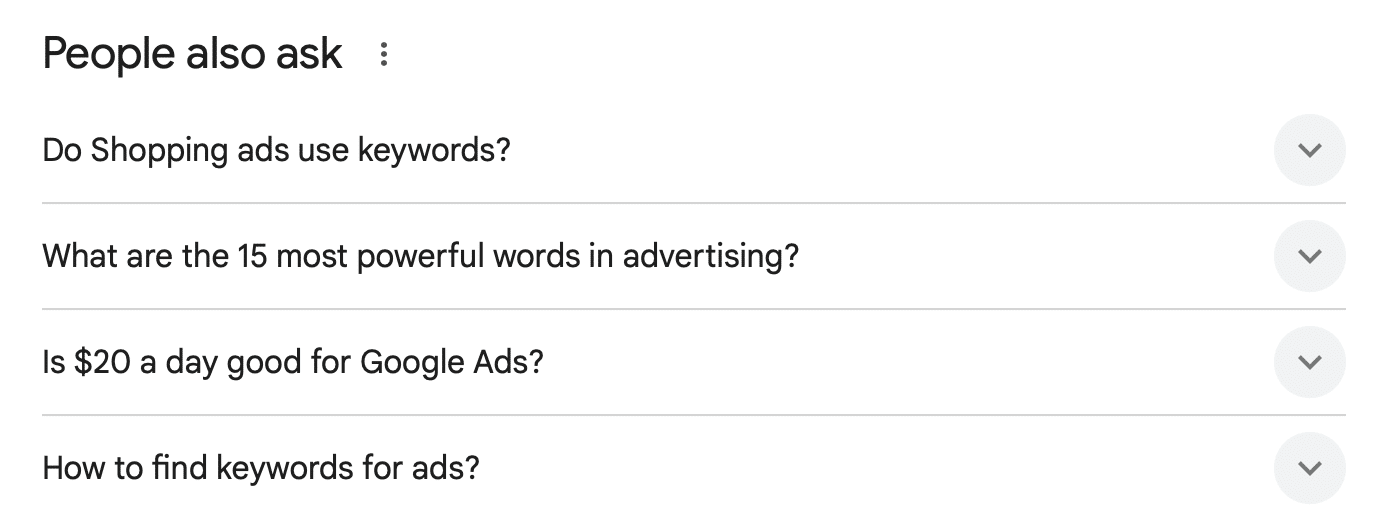
    On Google, also look for the People Also Ask section.
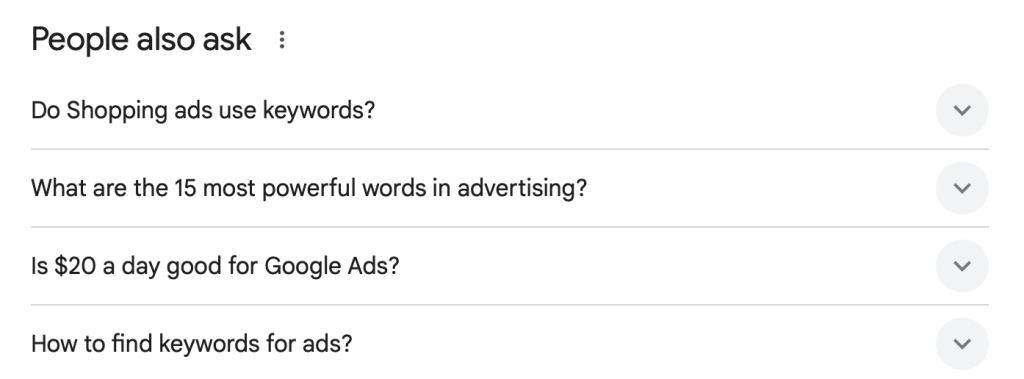
    Google Search section “People also ask”

    The great thing about using this technique to find keyword ideas is that major websites like Google, Amazon, and eBay understand the phrases the people use when searching for products, and they understand buying intent. They will show you answers which you may not have thought of.

    AdWords Keyword Planner

    You can also use the Keyword Planner in Google’s AdWords product to find keywords. You will need to have an AdWords account – it’s free.

    1. Sign in to your Google Ads account.
    2. Click the Tools icon (represented by a wrench symbol) in the top menu.
    3. Under the “Planning” section, select Keyword Planner

    The Keyword Planner will generate keyword ideas, and give you the average number of monthly searches for that keyword. You’ll also find AdWords bid information too, which can also be helpful because you can use the estimated bid for a keyword to get an idea of the level of competition that exists within the ad auction for that keyword.

    Research Your Competition

    The final source for e-commerce keyword research on this list is to check what your competitors use. Ubersuggest is a useful a keyword tool – it’s free to register but throttle control exists for daily searches.

    Also manually check competitor websites and look out for Page Titles of product pages as well as the titles they give to products. These are key words and key phrases.

    Keyword Research for E-Commerce SEO is an Ongoing Process

    SEO never stops. So don’t stop searching and adding to your list, finding new opportunities, and getting rid of under performing keywords. Make this a weekly 15 minute task.

    the numero® SEO team are happy to give your ecommerce store an audit to help you benchmark your performance against key competitors.
  • An Introduction to Keyword Research for E-Commerce SEO

    An Introduction to Keyword Research for E-Commerce SEO

    E-commerce Search Engine Optimisation (e-commerce SEO), is essential if you want to rank your online shop in as a high position on Google as possible. It will help your ranking on other search engines too, including Bing, but Google is the most important search engine for e-commerce businesses in New Zealand.

    Put simply, getting a high ranking in Google will ensure your website is seen by the masses.

    Doing this means knowing the specific keywords and phrases that people use in Google that are related to your content, website, or products

    This involves doing keyword research, which is an essential part of e-commerce SEO.

    Keyword Research

    Keep in mind that keywords needed for blogs and other website content will differ from those needed for your e-commerce store. The reason for this is that there are different types of searchers online. This includes people searching for general information, while others will be looking for products.

    In addition, you will have different types of people looking for products. This includes people who have just started their search right through to people who know exactly what they want to buy and are now looking for an e-commerce store that will give them the best deal.

    Your keywords must first appeal to product searchers, not the information searchers. You then ideally want to capture people who are close to making a buying decision.

    Find Keywords that Have Buying Intent

    The aim is to identify commercial keywords that indicate buying intent.

    Where do you find these keywords, however?

    You can start with places that people often use to search for products. This includes:

    • Google
    • Amazon
    • eBay
    • Any other strong website that sells similar products to yours

    Start by typing into the search box a keyword you think will rank well. You will then see autocomplete options that will show you other ideas that are related to the keyword you type.

    On Google, you can also scroll to the bottom of the search results page. There you will find a list of related search queries which can also be quite useful.

    The great thing about using this technique to find keyword ideas is that major websites like Google, Amazon, and eBay understand the phrases the people use when searching for products, and they understand buying intent.

    AdWords Keyword Planner

    You can also use the Keyword Planner in Google’s AdWords product to find keywords. You will need to create an AdWords account to do this, but getting an account is free.

    Not only will the Keyword Planner tool generate keyword ideas, it also gives you the average number of monthly searches for that keyword.

    It gives you AdWords bid information too, which can also be helpful, even when you don’t plan to run AdWords campaigns. This is because you can use the estimated bid for a keyword to get an idea of the level of competition that exists.

    Research Your Competition

    The final source for e-commerce keyword research on this list is to check what your competitors use. You may need a keyword tool to achieve this, although they can be expensive when you just want to check a few websites.

    You can, however, get information by manually checking the websites of your competitors. Things you should look out for are the Page Titles of product pages as well as the titles they give to products.

    Keyword Research for E-Commerce SEO is an Ongoing Process

    One final tip with keyword research for e-commerce SEO is that it is an ongoing process. Adding to the list, finding new opportunities, and lowering the priority of under performing keywords, will help you stay ahead of the competition.

  • Four SEO Basics to Begin Optimising Your E-Commerce Website

    Four SEO Basics to Begin Optimising Your E-Commerce Website

    Google can send free traffic to your e-commerce website and some of those visitors will then go on to buy something from you. Maximising the number of visitors that you get from Google, however, requires SEO.

    That said, SEO is a big topic, particularly for e-commerce websites. So, to get you started, here are four essential basics you need to know.

    Keywords

    Keywords are the phrases that potential customers type into Google when looking for the products you sell. When it comes to keywords, you should have the following goals:

    • Ensure your website appears on Google search results pages for all crucial keywords related to your products
    • Ensure your website appears as high up on these Google search results pages as possible

    You do this using several techniques:

    • Researching keywords so you know which ones to optimise your website for
    • Having one target keyword per page
    • Optimising each page by including the keyword in the page’s URL, title, heading, and in the content of the page
    • Telling people about the page to get them to link back to it

    That is a very quick overview, but it is a succinct description of the importance of keywords to SEO and how to make them work for your e-commerce website.

    Mobile-Friendly

    Having a mobile-friendly website is essential for SEO, whatever type of website you have. For e-commerce websites, however, this can be a bit more challenging.

    This is because many people consider how a website looks when they think about mobile. In other words, ensuring the website adjusts to display properly on a smaller screen.

    However, having a mobile-friendly website also means ensuring all the functions and features work for people using it on a mobile device. This includes your shopping cart and checkout processes.

    In fact, it should be just as quick, safe, and easy for a customer to buy something from your website using a mobile device as it is to make a purchase on a computer.

    Fast-Loading Website

    Your website should load quickly too. This is one area that many e-commerce websites fall down on, but it is critical. This is because Google loves fast-loading websites and it constantly advises website owners to make their websites faster.

    Consumers like fast-loading websites too. So, not only will a fast loading website help with your e-commerce SEO, it will also get you more sales.

    Reviews and Product Ratings

    The final essential SEO basic for e-commerce websites on this list is to add star ratings to the products you sell as well as getting reviews for your business. You should use one of Google’s approved services when doing this to ensure you get the maximum benefit.

    While the impact on rankings is not as great as other SEO factors, star reviews and ratings enhance the appearance of your website on search results pages. This is because Google displays star ratings on its search results pages, helping to encourage people to click.

    Getting Started with E-Commerce SEO

    Of course, there is much more to e-commerce SEO than the four points on this list. However, getting an understanding of these points and then taking action on them will improve your Google ranking and bring visitors to your website.

  • Choosing the Right Keywords for your Google AdWords Campaign

    Choosing the Right Keywords for your Google AdWords Campaign

    AdWords campaigns are a viable and, potentially, affordable way to bring a fresh influx of customers to your website. However, if you don’t use the right keywords, you run the risk of increasing the number of visitors without seeing any changes in your sales.

    Keywords help you tell Google who should see your ad to ensure you maximise every dollar invested in the campaign. When choosing keywords, there are several important rules to follow.

    #1: Think Like Your Customers

    If you were searching for black yoga pants, what’s the search term you would use in Google? Would it be ‘black yoga pants’ or just ‘pants’?

    When people want to buy, they are looking for specific products. So, to make sure your site pops up first when possible customers search for what they need, you should use specific keywords. True, highly specific keywords won’t bring as much traffic as general ones, but each click has a higher chance to turn into a sale. As a result, your campaign may get amazing results in terms of ROI, which is all you should care about.

    #2: Negative Keywords

    These are the keywords you use to make sure the wrong people don’t see your ads. For instance, if you sell TV sets but not PC monitors, you can add ‘PC monitors’ as a negative keyword. This way, people looking for a monitor won’t see or click on your ad, unnecessarily wasting your money.

    #3: Different Variations

    One way to make sure you reach as many customers as possible is to use different terms for what you’re selling. This includes synonyms, colloquial terms, common misspellings, singular and plural versions, and anything that usually shows up in searches.

    The secret is to use these versions for specific searches; don’t include general terms if you don’t want irrelevant clicks on your ad!

    #4: Use the Keyword Planner

    Google provides site owners with an easy-to-use tool that offers ideas for keywords and gives an estimate of the number of searches per month the keyword receives. As a result, you can estimate your ROI when planning and setting up a new Google AdWords campaign.

    The Keyword Planner tool also helps refine your initial keyword ideas to get a list that is more specific. For instance, if your initial keyword list included ‘snow boots’, the tool may show you that ‘cold weather boots’ is another keyword you should consider adding to your campaign.

    #5: Be Consistent

    As a rule of thumb, the keywords and phrases used in an AdWords campaign should be closely linked to the text you display in the PPC ad. Furthermore, the keywords should match the ones used on the landing page and website in general. This helps Google understand your ads are consistent.

    Overall, it’s important to make sure your ads are being clicked on by relevant viewers, i.e. those who are interested in making a purchase. A lot of that comes down to the keywords you choose, making keyword selection crucial to the success of your Google AdWords campaign.

  • Getting Started with E-Commerce in Auckland – A Beginner’s Guide

    Getting Started with E-Commerce in Auckland – A Beginner’s Guide

    There are plenty of advantages to owning an online e-commerce business in Auckland. This includes lowers costs than physical shops because you don’t have to pay rent and you will need fewer employees. An e-commerce website is also easier to maintain.

    E-commerce also offers advantages if you already have a business but want to expand online. At the top of that list is the fact your business will be in front of a wider and more diverse audience, increasing your brand presence and getting you more sales.

    However, before you move into online sales, you should also know what you’ll have to deal with when starting with e-commerce in Auckland.

    E-Commerce Platforms, Shopping Carts & Currency

    WooCommerce, Shopify, WIX, Magento, PrestaShop: which one is the best for your online store? They are all shopping carts, and the answer depends on your budget, customisation requirements, and the type of shopping cart you need.

    Each of these platforms offers different features, but they all have one thing in common: they power most of the world’s online stores.

    Since each platform offers shopping cart solutions, the only challenging part is setting it up for your business needs. This usually means setting your currency, prices, discounts, special offers, and more, which is why you should hire a specialist e-commerce website developer in Auckland for the job.

    Most big platform shopping carts offer options for e-commerce businesses that sell globally too.

    Regardless of the option you choose, it’s crucial you make sure the settings are correct and that your shopping cart works smoothly.

    Choosing a Merchant Solution

    Merchant solutions, also known as credit card processing solutions, handle the electronic payments coming through your website.

    In most cases, the shopping cart you choose will provide you with several merchant solution options. PayPal is one of the most widely used and trusted, but there are other options too.

    Also, think about your customers. PayPal, for example, is great when selling in Auckland and other parts of New Zealand. It is also popular in other countries, although this isn’t universal. Therefore, if you sell internationally, make sure the merchant solution you choose has a user base in your target countries.

    The SSL Certificate

    SSL stands for ‘Secure Sockets Layer’ and is a protocol that secures and protects data. The protocol encrypts data, such as personal or financial information, as it travels between your customer’s web browser and the server hosting your e-commerce store.

    While the presence or absence of an SSL certificate is important for SEO, when it comes to financial transactions, this certificate is mandatory if you want customers to trust you. After all, would you buy from a site that doesn’t do what it can to protect your personal information?

    Integration with Other Software Platforms

    Finally, make sure the e-commerce platform you choose can communicate with other software in your business such as inventory, storage management, CMS, CRM, and more.

    As you can see, there are many things to consider when starting out with e-commerce in Auckland. Getting them right from the start will save you money, time, and hassle in the future.

  • Website Design and SEO – Getting It Right from the Start

    Website Design and SEO – Getting It Right from the Start

    The easiest time to optimise your website for SEO is during the initial build phase. Getting it right from the start will give you a foundation to build on in the future. This means using a website designer in Auckland who understands SEO, but what are the things you should be aware of to ensure the job gets done properly? Are there things you can do?

    The Website Should be Responsive

    The starting point is your website should be responsive. This means using a design that automatically adapts – or responds – to a visitor’s device. In other words, ensuring your website looks great on phones and tablets as well as computers and laptops.

    Google is very focused on making the internet mobile-friendly, so this should be at the top of your website designer’s SEO checklist.

    One other point you should be aware of is that there are other ways of creating a mobile-friendly version of your website. Making the website responsive is the recommended approach, however, as well as being Google’s preferred option.

    Think About SEO When Writing Content

    Google uses keywords to connect website pages with people searching. Therefore, you should think about keywords when writing the content of your website pages. Specifically, you should include keywords in the content.

    Of course, your primary audience is the people visiting your website, so don’t use too many keywords (which looks spammy) and don’t use keywords in a way that makes sentences sound strange.

    Optimise Page Titles, Use Heading Tags, and Write Unique Meta Descriptions

    The page title is one of the most important SEO elements of your page. Google uses them to understand the content on the page, plus they appear on search results pages. You should have a unique page title for each page, plus you should include the page’s main keyword in the title.

    You should also use heading tags on your pages as Google looks for them. These are often referred to as H1, H2, etc headers. Ideally, include the main keyword of the page in the H1 tag.

    Each page on your website should also have a unique meta description. You will have seen many meta descriptions as they appear on all Google search results pages. They are the two lines that appear on a search result below the page title. Again, include the main keyword of the page in the meta description.

    Page Loading Speed is Crucial

    Google has always been obsessed with speed – it still shows you at the top of a search results page how long it took to do the search. This focus on speed applies to your website too. In other words, if you want to optimise your chances of appearing high on search results pages, you should ensure your website designer makes your website as fast as possible.

    The Design Should be User-Friendly

    User-friendly designs are important for SEO too. This means ensuring your website is free from clutter while also making menus easy to use and content easy to find. The more user-friendly your website is, the more Google will like it.

    Remember, designing a website is not just about making it look great – if this is the primary objective of your website designer you should be concerned. Instead, your website should deliver on your business objectives which, in most cases, means helping you get sales and leads. To do this, you need to get SEO right from the start.

  • Submitting to the App Stores – What You Need to Know

    Submitting to the App Stores – What You Need to Know

    Mobile applications provide several benefits to small business owners and their customers. As most web-based traffic moves to mobile and handheld devices, it’s more important than ever that your small business has a functioning app. Submitting applications to app stores can prove difficult if you’re starting from scratch, though. In this article, we’ll provide you with what you need to know to successfully submit an app to the Apple App Store and the Google Play Store.

    Apple App Store

    Design for Functionality

    Apple prefers apps that provide users with a specific, unique function. An app that purely drives traffic to a website is unlikely to meet Apple’s criteria. In addition, if your app has minimal functionality, it may not get approval either. So, make sure your app provides users with value.

    Follow Human Interface Guidelines

    Apple provides strict Human Interface Guidelines that help developers build acceptable applications. These guidelines cover a spectrum of different design and architecture rules. Apple does this to provide its users with a harmonious user experience across all available apps.

    These guidelines cover app architecture, user interaction, system capabilities, visual design, controls, extensions, and plenty of other crucial components. Not following these guidelines may result in rejection.

    Don’t Include Price in the App Description

    A simple mistake that a lot of users make when submitting their first app to the App Store is including a price in the description. The Apple App Store sets different prices for different regions, so don’t assume the price remains the same across the board. This is especially true if you plan on submitting your app internationally.

    Meet Ethical Standards

    Apple provides app developers with content guidelines – certain forms of content are not tolerated. This includes discriminatory and defamatory content, pornographic material, false features, encouragement of the illegal use of weapons, realistic portrayals of violence or death, and more. Make sure you review these guidelines before submitting.

    Google Play Store for Android Apps

    For those who use Android devices, the Google Play Store provides a separate set of challenges and requirements.

    Follow Developer Program Policies

    Google provides Developer Program Policies to help you understand the type of applications and methods it accepts. These policies dictate guidelines on restricted content, intellectual property, monetisation, store listing, privacy, and more. Make sure this your first stop when you start developing a new app.

    Follow Quality Guidelines

    On top of Google’s Developer and Program Policies, there are also Quality Guidelines that your app developers must follow. You can test your app’s core quality before submitting it for approval.

    Provide Compatibility Information

    Make sure you provide compatibility information to your users. Your app description should include what systems and devices the app is compatible with.

    Provide Pricing and Distribution Locations

    If your app costs money, you need to set the pricing and the various distribution locations. You will also need to set prices for the different locations. You can restrict your app from various regions if you only want it available in certain countries.

    Final Thoughts

    As a small business owner, you can save significant time and money when your app meets the requirements of each app store. Redesigning an app after a rejected submission will delay your project and inflate the price of development. Following the guidelines above will help secure app store approval.

  • 5 Web Design Tips for Small Businesses

    5 Web Design Tips for Small Businesses

    No matter what you use your small business website for, the design is always a top priority. Your website’s design provides visitors with their first look at your company, so you need to make as good of an impression as possible. Many business owners focus so much on the operational side of their business, however, that they forget about their websites.

    In a time where online commerce is an increasingly dominant portion of consumer sales, it’s more important than ever to focus on the design of your website. Here are five key tips that can help you design a customer-focused website.

    Follow Modern Trends

    Web design constantly evolves, with modern design trends updating regularly. If you want to gain trust and recognition through your website’s design, it’s important to keep up-to-date with modern trends. One way to achieve this is to use a web designer that can provide a minimalist yet aesthetically pleasing design that will never look outdated.

    Integrate Tools

    There are thousands of developers that provide useful tools and functions you can add to your current website. These tools provide effective ways to improve your site’s functionality and ease your workload on the backend.

    If you run an e-commerce site, for example, an effective online shopping cart that enables effortless transactions will be an invaluable addition to any site design.

    Interactive comments and community forums can also supply added functionality to your current platform. These are just a few examples of the thousands of integrated tools you can add to any website.

    Easy Site Navigation

    Modern consumers are impatient, so it’s important to ensure your site is easy to navigate. In particular, the different sections of your website should be clearly accessible when a page first opens. Creating clear, concise drop-down menus can help your customers find what they’re looking for. Plus, your visitors should find it effortless to navigate to any page.

    Optimise for Mobile Browsing

    Many new business owners make the mistake of only focusing on traditional web browsing when they build their new websites. This ignores the vast majority of people using the internet as mobile browsing is now the most prominent form of web browsing. In other words, more people use phone and handheld devices than traditional computers.

    Therefore, optimising your site to respond and display quickly to mobile users will help improve user experience.

    Provide Clarity

    While this may seem obvious, it is important to provide information about your business on your website. After all, the internet provides plenty of opportunities for scammers and imitators.

    By providing information about you, your services, and your experience, you will build trust with visitors. An About Us page can help, as can full contact details (including telephone numbers), testimonials, qualifications, and certifications.

    Finally, Never Underestimate Perception

    The way your customers perceive your website will reflect on the way they perceive your business. If you want to make the best initial impression possible, it’s important to compare yourself against your competitors.

    Online marketing is extremely competitive – if you don’t keep the design of your website up-to-par, you risk falling behind.

  • Using Website Design to Build Customer Trust in Your Brand

    Using Website Design to Build Customer Trust in Your Brand

    As e-commerce expands, the design of your company’s website is increasingly important. Consumers associate websites with the business behind the site, so it’s essential your business makes a good impression when prospective customers first land on your page. If you look at the websites of top brands, you’ll find they’re designed to build trust and portray an image of professionalism.

    So, how can you build customer trust in your brand via your website? The answer comes down to how the website is designed. In this article, we’ll take a look at some of the key features found on trustworthy websites.

    Testimonials

    One of the best ways to build trust in your brand is to provide testimonials for your customers. Modern consumers want to understand what past clients have thought of your work, so it’s essential you provide them with honest feedback from your past customers.

    This can be done through posting verified testimonials. There are third-party sites you can integrate into your website design that provide testimonials and reviews. This is a great way to give prospective clients immediate access to feedback on your services or products.

    Accreditations

    If your services or products rely on the expertise or certifications of your company, it’s important you provide customers with your accreditations. You should use the official logos of the accreditation or member society to ensure they appear reliable.

    Many companies place these across the top or bottom of their landing pages. Others have entirely separate pages for accreditations. Either way, providing your customers with evidence of your accreditations helps elevate your online brand.

    Project Pages (Portfolios)

    If you work in the creative space, placing a portfolio on your website is a great way to provide customers with samples of your work. Consumers want evidence that you’re capable of delivering their requests.

    The same goes for other types of industries such as construction, home renovation, and more. Project pages displaying recent successful projects can help build trust in your business.

    It’s best if the items in your portfolio are verifiable, though. So, if you’re permitted, include information on where your website visitors can find your projects on client pages or in the real world.

    Modern Design

    Website design is constantly changing making it more important than ever to stay up-to-date with the times if you want to portray yourself as a reliable brand. If you use a rudimentary website design, there’s a high chance your website will appear outdated and out-of-touch. For this reason, you should always seek to keep your website modern and ensure it doesn’t use spammy design techniques that take away from your brand’s image.

    Don’t Underestimate the Value of Trust

    In a world where there are scams around every corner, it’s more important than ever to ensure you have a website design that builds trust in your brand. E-commerce has provided a great platform for many online brands, but it has also increased competition for customers.

    If you want to grow your market share, it’s important you use the above features to improve your brand’s reliability.

  • Five Landing Page Tips for Google AdWords Campaign

    Five Landing Page Tips for Google AdWords Campaign

    Google AdWords is one of the primary ways online businesses drive traffic to their products and services. That said, if you’re planning on starting a Google AdWords campaign, it’s essential you create the best possible landing pages. The better your landing page, the better your ROI will be.

    In this article, we’ll take a deeper look at some tips that will help you optimise your landing page for a Google AdWords campaign. The tips are all aimed at reducing cost per click while also increasing conversion rates.

    Use Keywords or Key Phrases Clearly

    When customers click on Google AdWords landing pages, they typically have an exact product or service that they’re looking for. For this reason, it’s always important to clearly display the keyword or key phrase in the title of the page.

    Doing so provides your customer with an assurance they’ve come to the right place. Remember, your prospective customers have searched those keywords for a reason, so make sure they immediately see you may have the answer.

    Call to Action

    As with any good landing page, it’s important to have a compelling Call to Action (CTA). Your CTA should help the consumer understand why they’re purchasing your goods or services.

    For example, if you’re selling a service that helps generate web-traffic, your CTA should say something like “Help Me Improve My Web Traffic”. Despite this, many landing page designers make the mistake of using simple and non-descriptive CTAs, such as “click here”.

    Use Specific Ad Groups

    If customers can’t find exactly what they’re looking for quickly, they’re likely to push the back button on their browsers. So, if you have multiple product variations, it’s important to use different ad groups and segments. Plus, create different landing pages for different products or offerings too.

    Build Trust Through Clarity

    Consumers are becoming more aware of potential scams and unethical companies. Therefore, it’s more important than ever to build trust with your prospective customers. If customers find your current offering dodgy, they probably won’t stick around on your landing page for very long.

    One of the best ways to build trust in your brand is to provide immediate clarity to those who visit your landing page. For example, let prospective customers know who you are and what your business represents.

    You should also ensure your landing page uses modern website design techniques. After all, nothing screams unreliable like an outdated website.

    Mobile Optimisation

    As mobile browsing overtakes traditional browsing, there’s a high chance a substantial proportion of your web traffic comes via mobile devices. Mobile optimisation, therefore, is an increasingly important part of building a great landing page for a Google AdWords campaign.

    Optimising specific landing pages to work with mobile devices will ensure your website loads quickly and maintains a professional appearance. This is key to ensuring you keep the interest of prospective customers.

    Landing Pages are Key to Your Success

    In a Google AdWords campaign, your landing page is your primary contact point with your prospective customers. So, it is important it’s optimised to convert as many sales as possible. You will achieve this by using the above tips.